Consider the following table.
CREATE TABLE dbo.tbl
(
col1_pky INT PRIMARY KEY,
col2_nc_index INT
)
CREATE INDEX nc_col2_col1
ON dbo.tbl(col2_nc_index, col1_pky)
I have created a table dbo.tbl with the column col1_pky as primary key.
A composite Non Clustered index is created on col2_nc_index,col1_pky columns.As by definition every non clustered index contains the clustered index key.
So going by definition, the non-clustered index should contain the following
* col2_nc_index,col1_pky - Index definition
* col1_pky - Clustered Index key
col1_pky is supposed to repeat twice as its a part of the nonclustered index and also clustered index key. But, SQL Server avoids the same by not storing the same
column twice.
/* Data Generation Script */
DECLARE @col1 INT,
@col2 INT
SET @col1 = 1
SET @col2 = 10000
WHILE @col1 < 10000
BEGIN
INSERT INTO tbl
SELECT @col1,
@col2
SET @col1 = @col1 + 1
SET @col2 = @col2 - 1
END
As usual let us use DBCC IND / PAGE to check the same.
To check the root page
DBCC ind ( 'dbadb', 'tbl', -1) 
Root page is found as 18684
Let us take a look at the contents of root page using DBCC PAGE
DBCC traceon(3604)
GO
DBCC page(dbadb, 1, 18684, 3)
GO 
Note that col1_pky appears only once and doesnt appear twice. To confirm the same let us check the contents of a leaf level page.
DBCC page(dbadb, 1, 19044, 3)
GO 
Again col1_pky is present only once. So, SQL Server always stores a column only once in a table.
Monday, September 27, 2010
SQL Server never stores the same column twice

Sunday, September 12, 2010
Avoiding Explicit Permission - Execute as clause
Providing direct access on tables for application user accounts is always a security concern. But, there are some scenarios which forces us to do the same. I previously discussed it in detail over here. SQL Server 2008/2005 provides a few options to avoid providing direct rights, even when the stored procedure involves dynamic sql, DDL, cross database reference etc. This post will explore one such option.
Execute AS option:
While creating stored procedures, we can specify EXECUTE AS clause to run the stored procedure under a different account. For example consider the following
CREATE PROCEDURE dbo.Rights_check
AS
BEGIN
DECLARE @txt NVARCHAR(100)
SET @txt = 'Select * from databaselog'
EXEC Sp_executesql @txt
END
GO
Let us grant rights to account test1, which doesn't have direct access to 'databaselog' table.
GRANT EXEC ON dbo.rights_check TO test1
GO
Executing the 'dbo.rights_check' procedure from 'test1' account fails as test1 doesn't have direct access on 'databaselog' table.Using 'Execute As' clause can allow test1 to execute 'dbo.rights_check' procedure successfully without directly providing rights on the 'databaselog' table.
ALTER PROCEDURE dbo.Rights_check
WITH EXECUTE AS owner
AS
BEGIN
DECLARE @txt NVARCHAR(100)
SET @txt = 'Select * from databaselog'
EXEC Sp_executesql @txt
END
I have just added the EXECUTE as OWNER clause on top which ensures that the stored procedure is executed in the context of owner of the stored procedure. Execution of the stored procedure using test1 is successful as expected.
The reason is, adding EXECUTE as OWNER allows any account which has execution rights on the stored procedure to execute under the security context of the owner of the stored procedure. This ensures that the executing account is allowed to obtain the special permissions only within the stored procedure and not outside the scope of it.
EXECUTE AS clause provides additional options like EXECUTE as 'user_name'. EXECUTE as 'user_name' allows one to execute under the context of particular user account instead of owner of the object.More details on the same can be read here.
EXECUTE AS clause effectively solves the security problems that arise when DDL statements, dynamic sql, cross database references are used.Digital Signatures, introduced in SQL Server 2005 also helps in addressing similar security problems which we will cover in the next post.
Monday, September 6, 2010
DBCC IND/ PAGE - Unique Non Clustered index structure
I am back after a short break. Few personal and official commitments have kept me away from posting. Apologies.From now on I will be posting at usual pace.
Continuing from my series of posts on DBCC IND, DBCC PAGE, this post will deal with the structure of Unique Non clustered index.Refer to the following links for previous posts on the same topic
1. DBCC IND/PAGE intro - Refer here
2. DBCC IND/ PAGE - Non Clustered Index structure on a table with Unique/Non unique Clustered index - Refer here
Structure of a Unique Non clustered index is different from ordinary ( Non unique ) non clustered index. The difference is that the Clustered index columns,
which are normally a part of Non clustered index, are not present in the Non leaf nodes when the Non clustered index is unique.When a Non clustered index is
unique, the clustered index columns are stored only in the leaves of the Non clustered index.
A detailed explanation on the same is given by the legendary Kalen Deanley :) Who else in the planet can explain internals better than her?
So, for more details on the topic, refer to her article here.
Tuesday, August 17, 2010
Stored Procedures , Explicit Permissions and Security concerns
Its always a good practice to have your code wrapped in stored procedures.
One of the reasons is Security. To explain a bit more, when one grants execution rights on a stored procedure to a user, the user gets the rights to perform all the operations ( Select/Insert/update/delete ) within the stored procedure.However, the same user cannot perform the operations outside the context of stored procedure.
Ex:
GRANT EXEC ON dbo.usp_stored_proc TO user1
Assume that the stored proc dbo.usp_stored_proc performs Select and update on table1, then user1 can perform these operations only while executing dbo.usp_stored_proc and not directly. In other words, user1 cannot bypass the stored procedure and directly perform a select/update on table1.
But there are a few operations, where one needs to explictly grant permission to a object inside a stored procedure.In other words, its not enough if we just grant EXEC rights on the stored procedure. Let me list down such scenarios.
1) Using Dynamic sql queries using sp_executesql / EXEC :
If your stored procedure is using Dynamic SQL using sp_executesql then the
objects accessed in the dynamic sql require explicit permissions.
For Example
CREATE PROCEDURE dbo.Usp_stored_proc
AS
BEGIN
DECLARE @dsql NVARCHAR(100)
SET @dsql = ' Select * from table1 '
EXEC Sp_executesql @dsql
END
GO
For the above stored procedure, its not enough if we grant execution rights to
dbo.usp_stored_proc. In addition,one needs to grant select rights on 'table1' for the user executing stored procedure. Explicit grant is required because dynamic sql are always treated as separate batch outside the scope of the stored procedure.
2) Cross database reference
If you are accessing a table on another database, then one needs to explicitly grant rights.
CREATE PROCEDURE dbo.Usp_stored_proc
AS
BEGIN
SELECT empid,
salary,
increment,
name
FROM hr_database.dbo.salary
WHERE username = 'clerk';
.......
...........
Some code
..........
...........
END
GO
In the above stored procedure, the salary from database 'HR_database' is accessed. The user who calls the stored procedure should have rights on the HR_database.dbo.salary for the stored procedure to execute successfully.
Please note that the above scenario is true, when cross database ownership chaining is not enabled.If cross database ownership chaining is enabled, and if both the objects(dbo.usp_stored_proc and HR_database.dbo.salary;) belong to the same owner, then explicit permissions need not be granted.
3) While using linked servers
CREATE PROCEDURE dbo.Usp_stored_proc
AS
BEGIN
SELECT *
FROM linkedserver.DATABASE.dbo.table2;
END
GO
On the above stored procedure, linked server is used to refer to a table in a remote server.In such a case, the login that maps the user ( executing the stored procedure ) to the remote server should have select rights on table2. For understanding login mappings on linked server refer here.
4) Using DDL statements
CREATE PROCEDURE dbo.Usp_stored_proc
AS
BEGIN
TRUNCATE TABLE dbo.t1;
END
GO
If the stored procedure contains DDL statement like truncate,alter table, Create index then appropriate rights should be granted to caller of the stored procedure.Meagre execution rights on the stored procedure wouldnt suffice.
On all the four scenarios listed above, ideally one would want the caller of the stored procedure to use these extra permissions only while executing the stored procedure. At the rest of the time, we wouldnt want the caller to gain direct access on the table.But by granting the rights explicitly, the caller of the stored procedure gets additional rights to perform the above mentioned operations without executing the stored procedure. ie, anyone can use the calling account and connect to the database and perform a Select on a entire salary table on HR_database or truncate a table t1, without executing stored procedure. Obviously, this can be a serious security concern.
To prevent the same, there are a few excellent options in SQL Server 2005, SQL Server 2008 which will be discussed in the next post.
Monday, August 9, 2010
DBCC IND/ PAGE - Non Clustered Index structure on a table with Unique/Non unique Clustered index
Continuing from the last post, let us analyze the structure of a non clustered index using DBCC IND/PAGE commands, when we have a clustered index on the table. To be specific, we will see the difference in structure of a Non Clustered index when we have unique clustered or non unique clustered index.
As already written earlier here, a Non clustered index will store clustered index key in its index.However, there is a small change in Non clustered index when the clustered index is defined as Non unique.When one searches using the Non clustered index , the clustered index key helps in reaching the actual row in the table. But, when the clustered index is not unique SQL Server adds a additional Unique identifier column along with the clustered index key on the non clustered index. We will see the same using DBCC IND and DBCC PAGE commands.
Table structure is provided below. Students table has 2 columns namely 'student_name','sid'.'sid' has a UNIQUE clustered index. student_name has a non clustered index.
CREATE TABLE [dbo].[students]
(
[student_name] [VARCHAR](50) NULL,
[sid] [INT] NULL
)
ON [PRIMARY]
CREATE UNIQUE CLUSTERED INDEX [CIX_students_id]
ON [dbo].[Students] ( [sid] ASC )
CREATE NONCLUSTERED INDEX [IX_students_name]
ON [dbo].[Students] ( [student_name] ASC )
I have loaded about 100,001 rows on the table. Let us see the structure on Non clustered index [IX_students_name] using DBCC IND/PAGE command.
Following steps are involved in reading the structure of the index.
1) Finding the root page of the index.
Execute the following command.
DBCC ind ( dbadb, students, 2)
GO
The third parameter is the ID of Non Clustered index [IX_students_name] which is obtained from sysindexes table.So we see only the pages of [IX_students_name] in our result set.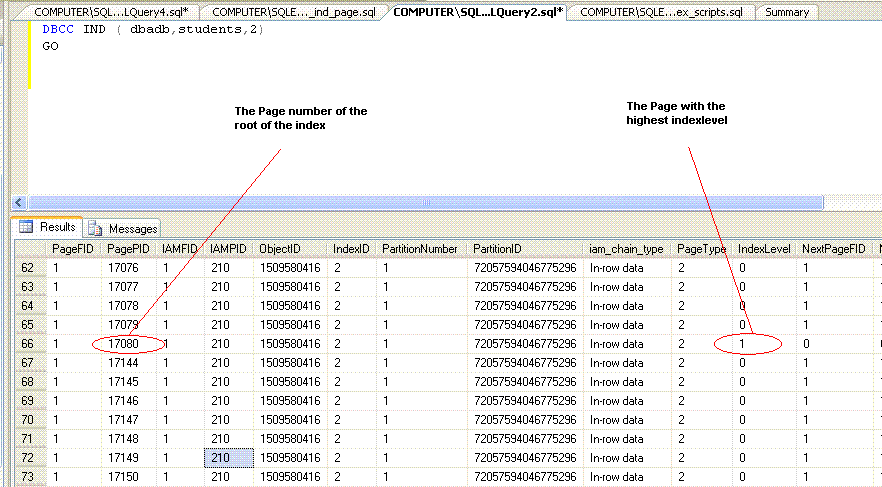
The command will show all the pages in the index. To identify the root of the index , identify the row with the highest Indexlevel. Indexlevel 0 refers to leaf pages. In Students table, the highest Indexlevel is noted as 1( which means there are only two levels on the index ie root and leaves ) and the page number is 17080.
2) Checking the contents of the root page
For checking contents of the root page execute the following command.
DBCC traceon(3604)
DBCC page(dbadb, 1, 17080, 3)
GO 
You would see the non clustered key and clustered index key ( sid ) column on the root page of [IX_students_name].But there wont be any Unique Identifier as the Clustered index is unique.
Non clustered index structure with a non unique clustered index:
Now let us check the structure of the Non clustered index when we have Non Unique clustered index.For that let us alter our clustered index to non unique cluster using the following command.I have just removed the UNIQUE keyword from the earlier script and recreated the clustered index using DROP_EXISTING = ON option.
CREATE CLUSTERED INDEX [CIX_students_id]
ON [dbo].[Students] ( [sid] ASC )
WITH ( drop_existing = ON) ON [PRIMARY]
After executing the above command, the clustered index is non unique.
Now let us again analyze the structure of Non clustered index.
1) Root of the index
DBCC ind ( dbadb, students, 2)
GO 
Root page number is noted as 15992
2) Contents of the root page
DBCC traceon(3604)
DBCC page(dbadb, 1, 15992, 3)
GO 
Picture of index page with Uniquifier
You would notice that a new column called 'Uniquifier' is added to the non clustered index's leaf page as the clustered index is not unique anymore. Uniquifier has NULL values as there are no duplicate rows in the table.
Let us introduce a duplicate value in the table using the following script.
SELECT *
FROM students
WHERE sid = 100000
GO
/* just to confirm that i have only one row. */
INSERT INTO students
SELECT *
FROM students
WHERE sid = 100000
/* Manually inserting a duplicate */
SELECT *
FROM students
WHERE sid = 100000
GO
/* Verifying that we have a duplicate */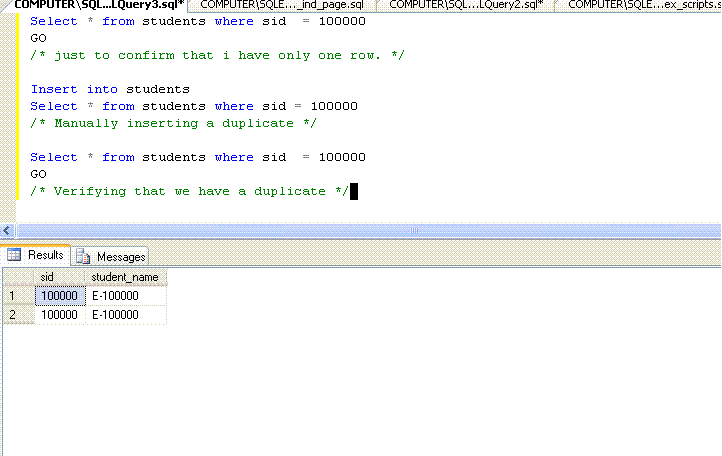
Note that the row has a value E-100000 on student_name column
Locating a value with in the index using DBCC IND/ DBCC PAGE:
To see how uniquifier is used in Non clustered index ,we need to find the duplicate row on the Non Clustered index with the value 'E-100000'. To do the same let us follow the following steps.
1) Finding the root page:
We already know that root page id of [IX_students_name] is 15992
2) Identify the page in which E-100000 is residing
Fire the same DBCC page command used earlier
DBCC traceon(3604)
DBCC page(dbadb, 1, 15992, 3)
GO
The resultset of DBCC PAGE is quite similar to a telephone directory index page where key column(s) ( student_name ) is the name of the person we are searching for and ChildPageid column is the Pagenumber in the directory.
For example,observe the Picture of index page with Uniqufier posted above.The value A-19032 on the student_name column ( 2nd row ) indicates that page number 15929 ( child page id ) contains rows starting from A-19032 and just before 'A-28080'. So to find E_10000 we should scroll to the row that exceeds (alphabetically) E-10000 by just and then goto the previous row and pick up the corresponding childpageid.
Observe the first row that alphabetically exceeds E-100000.
Refer to the row before that which is likely to contain E-100000.ChildPageID gives the page number of the page linked to row. The Childpageid on the immediate previous row exceeding E-100000 is 8605. So Page number 8605 should contain E-100000.So, execute the following command.
DBCC page(dbadb, 1, 8605, 3)
GO 
Notice two rows with 'E-100000' which reflect the duplicate row we inserted earlier.
Note the uniquiefier column for rows containing E-100000. They have values of 0,1 which will be used to identify the correct row in the clustered index.
So, the conclusion of this long post is if you have a Non unique clustered index,
then additional Uniquifier column will be added in the Non clustered index to locate the correct row.
Monday, August 2, 2010
DBCC IND, DBCC PAGE - Intro
DBCC IND
DBCC IND command provides the list of pages used by the table or index. The command provides the page numbers used by the table along with previous page number,next page number. The command takes three parameters.
Syntax is provided below.
DBCC ind ( <database_name>, <table_name>, non clustered index_id*)
The third parameter can either be a Non Clustered index id ( provided by sys.indexes ) or 1,0,-1,-2. -1 provides complete information about all type of pages( in row data,row over flow data,IAM,all indexes ) associated with the table. The list of columns returned are provided below.
IndexID: Provides id of the index. 0 - for heap, 1 - clustered index.,Non
clustered ids > 2 .
PagePID : Page number
IAMFID : Fileid of the file containing the page ( refer sysfiles )
ObjectID : Objectid of the table used.
Iam_chain_type: Type of data stored ( in row data,row overflow etc )
PageType : 1 refers to Data page, 2 -> Index page,3 and 4 -> text pages
Indexlevel: 0 - refers to leaf. Highest value refers to root of an index.
NextPagePID,PrevPagePID : refers to next and previous page numbers.
Example:
The command provides the pages used by table named Bigtable in database dbadb.
DBCC ind(dbadb, bigtable, -1)

DBCC PAGE:
Next undocumented command we would be seeing is DBCC PAGE:
DBCC PAGE takes the page number as the input parameter and displays the content of the page.Its almost like opening database page with your hands and viewing the contents of the page.
Syntax:
DBCC page(<database_name>, <fileid>, <pagenumber>, <viewing_type>)
DBCC PAGE takes 4 parameters. They are database_name, fileid, pagenumber, viewing_type.Viewing_type parameter when passed a value 3 and displays the results in tabular format.If you are viewing a data page then the results are always in text format. For Index pages, when we pass the value 3 as parameter we get the results in a tabular format.DBCC PAGE command requires the trace flag 3604 to be turned on before its execution.
A sample call is when a Index page is viewed is provided below:
Note that the page number picked (9069) is a page from clustered index of the table
'Bigtable'. 'Bigtable' has a clustered index on a column named 'id' .
DBCC traceon(3604)
GO
DBCC page(dbadb, 1, 8176, 3)
GO

Useful columns returned are provided below:
Level : Index level
id(Key) : Actual column value on the index. The indexed column name suffixed with '(key)' becomes a part of a result set. If your index has 4 columns then 4 columns with the suffix '(key)' will be a part of your result set. In the above example the data/values on column 'id' present in the page 8176 are displayed.
ChildPageid: Pageid of the child page.
A sample call when a data page number is passed is shown below:
DBCC traceon(3604)
GO
DBCC page(dbadb, 1, 9069, 3)
GO
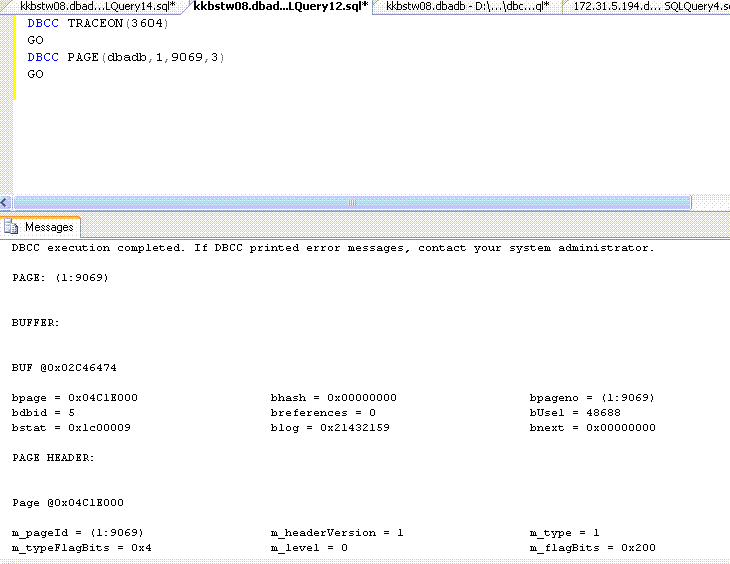
Bit cryptic to read the text format results. But anyways we will using it less compared to index page results.
What we intend to do with these two commands ?
These two commands help us understand index structures, they way pages have been allocated and linked in a much better way. DBCC IND and PAGE are the two commands with which we can really get our hands dirty while trying to understand index structures. In the next couple of posts, I will analyze index structures using these commands and provide some interesting inferences on how index structures are arranged internally.
References : As usual Kalen Deanley - SQL Server Internals :)
Sunday, July 25, 2010
Disabling Primary Key/ Clustered index
Most of us are aware that indexes and constraints can be disabled. This post will concentrate on what happens when a Clustered index or Primary key is disabled.
When a Clustered index is disabled , irrespective of whether it is a part of primary key or not, the entire table is placed offline. Placed offline essentially means that one cant issue any select/insert/update/delete on the table and also all the other indexes associated with the table are disabled. When a clustered primary key is disabled, in addition to the impact happening because of disabling clustered index, the foreign key constraints on the tables that are referencing the disabled primary key are disabled as well.But the most important part is when you enable back your primary key, the foreign key constraints still remain disabled. We will see a quick example.
I have a student table with sid column as clustered primary key.
CREATE TABLE [dbo].[Student]
(
[sid] [INT] NOT NULL,
[student_name] [VARCHAR](50) NULL,
CONSTRAINT [PK_Student] PRIMARY KEY CLUSTERED ( [sid] ASC )
)
GO
CREATE INDEX ix_student_name
ON [Student]([student_name])
GO
Student_marks table references student table. Script for the same is provided below.
CREATE TABLE [dbo].[student_marks]
(
[sid] [INT] NOT NULL,
[marks] [INT] NULL,
[subject_name] [VARCHAR](50) COLLATE sql_latin1_general_cp1_ci_as NOT NULL,
[subject_id] [INT] NOT NULL,
)
GO
ALTER TABLE [dbo].[student_marks] ADD CONSTRAINT [FK_student_marks_Student]
FOREIGN KEY([sid]) REFERENCES [dbo].[Student] ([sid])
GO
Let us disable the primary key on the student table. It can be done by
ALTER INDEX pk_student ON dbo.student DISABLE
GO
Warning: Foreign key 'FK_student_marks_Student' on table 'student_marks' referencing table 'Student' was disabled as a result of disabling the index 'PK_Student'.
Warning: Index 'IX_student_name' on table 'Student' was disabled as a result of disabling the clustered index on the table.
We obtain a warning message saying that the Non Clustered Index on student table and the foreign key constraint on student_marks table are disabled.The same can be confirmed by querying sys.foreign_keys tabled. The is_disabled column with a value one indicates that the constraint is disabled.
SELECT Object_name(parent_object_id) AS table_name,
Object_name(referenced_object_id) AS referenced_pky_tbl_name,
is_disabled,
name AS constraint_name,
type_desc
FROM sys.foreign_keys
WHERE Object_name(referenced_object_id) LIKE 'student' 
Now let me enable the Primary key constraint back on student table.
The command used is provided below.
ALTER INDEX ALL ON dbo.student rebuild
Primary key constraint is enabled by using the Index Rebuild command. One can rebuild just the Clustered index to enable the primary key but that would not enable the other non clustered indexes on the table. ALTER INDEX ALL enables all the indexes that are present in the table and hence it is the recommended command if you have disabled your clustered primary key.
To prove that foreign key is not enabled,let me insert a row into student_marks table which violates the constraint.I execute the following script which effectively proves the same.
SELECT *
FROM student
WHERE sid = -1
GO /*-- To ensure that no row on student has sid = -1 */
INSERT INTO student_marks
(sid,
subject_id,
subject_name,
marks)
SELECT -1,
1,
'Tamil',
60
GO
SELECT *
FROM student_marks
WHERE sid = -1
GO /* to confirm that insert was successful */
SELECT Object_name(parent_object_id) AS table_name,
Object_name(referenced_object_id) AS referenced_pky_tbl_name,
is_disabled,
name AS constraint_name,
type_desc
FROM sys.foreign_keys
WHERE Object_name(referenced_object_id) LIKE 'student'
GO 
To enable the constraint first delete the invalid row and then use Check constraint command.
DELETE student_marks
WHERE sid = -1
GO
ALTER TABLE [dbo].[student_marks] WITH CHECK CHECK CONSTRAINT CONSTRAINT [FK_student_marks_Student]
So, the conclusion of this post is always remember to enable the foreign key constraints after you have disabled and enabled your primary key. Let me finish the post with a quick script to generate a script for enabling foreign key
constraints.
DECLARE @primary_key_tbl_name VARCHAR(500)
SET @primary_key_tbl_name = 'student'
SELECT 'ALTER TABLE [' + sys.schemas.name + '].[' +
Object_name(parent_object_id) +
'] WITH CHECK CHECK CONSTRAINT [' + sys.foreign_keys.name + ']' AS
enable_fky
FROM sys.foreign_keys,
sys.schemas
WHERE Object_name(referenced_object_id) LIKE @primary_key_tbl_name
AND is_disabled = 1
AND TYPE = 'F'
AND sys.schemas.schema_id = sys.foreign_keys.schema_id
GO
Set the value of @primary_key_tbl_name to the table whose primary key you have disabled. Executed the script after you have disabled and enabled the primary key. The Script pulls the related foriegn keys to the table and generates the enable script for the same.