Showing posts with label Best Practices. Show all posts

Saturday, December 2, 2017

Data Channel Interview - 09 - Mr.Madhivanan on Best Practices in TSQL Programming

Dear All,

Very happy to share the 9th interview of #DataChannel. Mr.Madhivanan Ramachandran, 10 time Microsoft MVP Award winner and a Data Platform expert from India discusses "Best Practices for TSQL Programming".  Mr.Madhivanan demystifies quite a few concepts with his to the point answers in this interview. Happy Learning!!!


Regards,
Nagaraj 

Monday, May 27, 2013

How to Size the SQL Server Memory & Why is it important?

The following blog post has 2 objectives.

 1) How to size the memory correctly ( or atleast being close to correctly )
 2) Why is it important to size the memory ( & not leave it default after installation )


First let me address item 2.

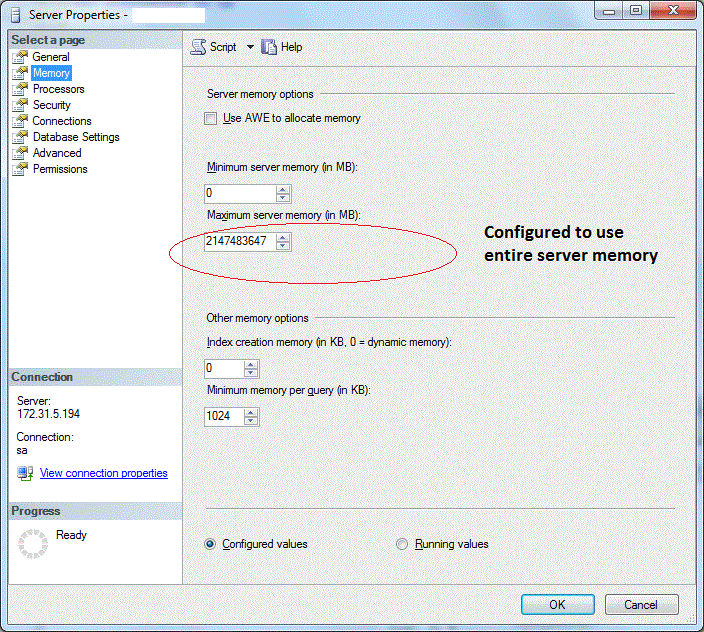
Setting a upper limit to the memory that SQL Server can use is termed as sizing memory on SQL Server.One of the common mistakes done on SQL Server Database Server is not sizing the memory. By default, after a typical installation, SQL Server is not set any upper limit on the amount of memory it can use. In other words, after a default installation, SQL Server is configured to use any amount of memory that is available on the Server. For ex ., if you have 32 GB RAM server and set up SQL Server, by default settings SQL Server is allowed to use the entire 32 GB. After a default installation, the memory setting of a server looks like the picture below.

The number "2147483647" just implies SQL Server has no upper limit and will use all the memory on the server.

      As I explained previously over here, SQL Server by design uses all the memory that is allocated to it. For ex., If SQL Server is allocated 26 GB of RAM ( out of say 32 GB on the server ), it utilizes entire 26 GB. SQL Server is designed in such a way, so that it reduces the need to read the disk frequently and leverages maximum on the memory allocated to it.

    So, why is it bad not to configure a upper limit? The reason is as SQL Server starts using the memory, its memory utilization goes on increasing ( by design as explained above ) day by day and at one point will leave very little memory for Windows Operating system to function. Windows Operating system requires adequate memory for healthy functioning of the server. When SQL Server has no upper limit, SQL Server consumes all the memory on the server, leaves operating  system to starve, bringing slowness to overall server. Usually under such circumstances, the memory utilization is over 97 or 98% with almost 90% used by SQL Server.

   When the Operating system experiences memory pressure, though SQL Server may be functioning as usual, physically perfoming any operation on the server ( logging in to the server, copying files, opening sql server client tools  etc ) may be extremely slow. Prolonged persistance of the problem ( for a few days to a week ), can result in a unexpected shutdown / restart of the server. Like many of Microsoft problems, after restart the problem vanishes for a while and comes back once memory utilization increases again.

  Now for the second part of the post. How to Size the memory?

    Though sizing the memory accurately is a task to be done meticulously taking quite a few parameters into account, I stumbled upon a dummies guide to configure the memory needed for SQL Server and OS to function smoothly.The article written by Jonathan Kehayias, a industry expert, provides a simple formula in layman terms, with which you ensure you have configured enough memory for the OS & SQL to run smoothly. Please refer to the article here.

   Brief explanation of the technique to size the memory is given below. The amount of memory to be given to Operating System

  1.  1 GB of memory reserved to Operating System
  2.  1 GB each for every 4 GB in 4 to 16 GB
  3.  1 GB each for every 8 GB in more than 16 GB.
ie., if you have a 32 GB RAM Database Server, then memory to be given to Operating System would be

  1. 1 GB, the minimum allocation +
  2. 3 GB, as 4 to 16 GB has 12 GB and 12 Divided by 4 GB ( each 4 GB gets 1 GB ) is 3GB +
  3. 2 GB, as 16 to 32 GB has 16 GB and 16 divided by 8 ( each 8 GB after 16 GB gets 1 GB ) is 2 GB
So in total for a 32 GB server, 7 GB will be reserved for the Operating System. This implies maximum memory allocated to SQL Server should be 25 GB. Similarly, for a 64 GB Server, 10 GB should be reserved for the Operating System & 54 GB should be allocated for SQL Server.

Above method ensures Operating System has enough memory to function smoothly and doesnt starve for memory.One may attempt to increase the max memory allocation to SQL Server more than what is recommended by the technique above when SQL Server internally is facing memory pressure. However, by doing so, one needs to ensure, Operating System doesn't starve for memory. The above technique of sizing the memory is sufficient for both OS & SQL in most of the cases.

To conclude, as a DBA,it is extremely important to ensure upper limits for memory is configured for SQL Server to prevent sudden performance issues.

Monday, July 19, 2010

Number of Drives,Location and Raid levels


When you are setting up your new server, One of the important tasks you have its to pick the right number of disks for correct purposes at the correct RAID level. This article briefly deals with the same.

SQL Server Data files: One needs atleast one dedicated drive for Data files. Ideally, for best performance one needs the disk to be have it Raid 10 as it involves random reads and random writes.

SQL Server Log files: Log files have more sequential reads and writes. To avoid any IO contention, one needs a dedicated drive at Raid 1.

SQL Server Backups: Backups are always to be kept on a drive different from data and log files so that they don't become a single point of failure. ie., When your data/ log file drive gets corrupted then your backups are also lost , if placed on the same drive. As Backups involve high writes RAID 1 / RAID 10 is recommended.

Location of Operating System: Operating system is ideally to be placed in C:\ drive and should always be kept away from data file drive, log file drive and backup drive.

Location of SQL Server executables: SQL Server's executables are similar
to operating system files and hence we are better off keeping them away from Data and log files.

Tempdb location: In general, tempdb involves heavy writes and ideally Raid 1 or Raid 10 is recommended.It is a luxury if you can afford a separate disk for tempdb. If your application heavily uses tempdb then you are strongly recommended to do so.

So, Ideally one atleast needs 3 dedicated disks for SQL Server with one each for Data file , Log files, Backups.Note that this doesn't include C drive required for Operating system + SQL Server's executable.Out of the 3 dedicated SQL Server, one is expected to be on RAID 10. I realize that RAID 10 is the most expensive but all good things in this world are expensive., aren't they :) The most popular raid level, RAID 5 is mostly good for reads and for file servers which don't change much. RAID 5 performs 50% slower than RAID 10.

References: As usual another cool Brad McGhee article from here.

Sunday, June 6, 2010

Scalar functions - on where clause


Scalar functions as discussed in the last post can be a performance bottleneck.Another place where Scalar functions ( both user defined and system ) can become a performance bottleneck is when used on a where clause of the query. Scalar functions when used on a where clause of a query can make the optimizer pick a table scan, even if the index is present, making the index useless.

/****** Object:  Index [ncix_Supplier_product_customer_trans_date]   ******/
CREATE NONCLUSTERED INDEX [ncix_Supplier_product_customer_trans_date]
  ON [dbo].[Supplier_Product_Customer] ( [trans_date] ASC )
  ON [PRIMARY] 


A non clustered index on trans_date column of supplier_product_customer table has been created.When one needs to find the list of transactions for a particular day ( cutting the time part of the , the most common method of writing the query would be

SELECT *
FROM   [Supplier_Product_customer]
WHERE  Datediff(dd, [trans_date], '11/19/2009') = 0 


But,the problem with such a query is that it takes table scan instead of using the Non clustered index created on trans_date. The reason is that scalar function datediff used on trans_date column stops the query analyzer from using the index.


A better way of writing it would be

SELECT *
FROM   supplier_product_customer
WHERE  trans_date >= '20091119'
       AND trans_date < '20091120' 


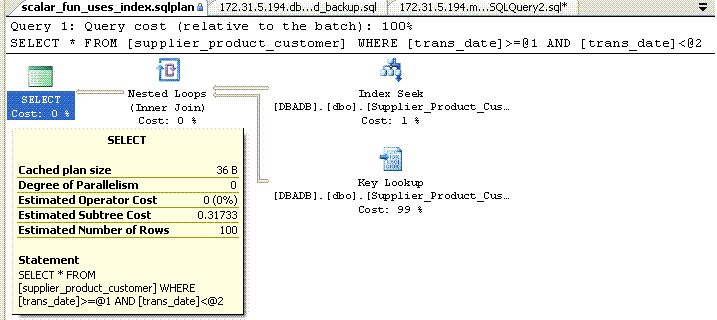
The picture above shows a non clustered index seek instead of table scan. There are few other common scenarios where functions can be avoided. Let me briefly list them here

* Left() string fuction can be effectively replaced by like
'str%'

* Usage of upper/lower string functions can be avoided
when the database has a case insensitive collation.
* isnull(col1,'xyz') = 'xyz' can be replaced by col1 = 'xyz'
or col1 is null

Note that OR conditions do use indexes and but at times they don't.
Please check before use.
* Getting data older than 60/n days query.
Standard way of doing it would be

Where datediff(dd, trans_date, getdate()) > 60 

Replaced by

Where trans_date < CONVERT(VARCHAR, getdate()-60, 112) 


To Conclude, one should try the best to avoid having scalar functions in where clauses.

Tuesday, May 25, 2010

Performance comparison - Functions versus Joins


User defined Scalar function is often chosen as a easier alternative for joining two or multiple tables while writing queries by developers. Other reason given by 'Few' developers is that its provides better readability on a long query. Both are bad reasons for using functions as scalar functions when used inappropriately can potentially kill the performance.

Scalar function when used on a query is executed for every row of the result set, just like a cursor would do. Row by Row processing is very very expensive when compared to SET based processing provided by joins. Scalar functions also makes indexes on the joined tables less effective or even useless.Above factors make joins, in general, a better option when they can replace a scalar function.

We will see the same with an example.

Consider the following tables student , student_marks . Student table contains student details and student_marks contain marks obtained by students on 5 subjects. Table definition and random data population scripts are provided below.


/***********************************************/
/************* Table [dbo].[student_marks]******/
CREATE TABLE [dbo].[student_marks]
  (
     [sid]          [INT] NOT NULL,
     [marks]        [INT] NULL,
     [subject_name] [VARCHAR](50) NOT NULL,
     [subject_id]   [INT] NOT NULL,
     CONSTRAINT [PK_student_marks] PRIMARY KEY CLUSTERED ( [sid] ASC,
     [subject_id] ASC )
  )
ON [PRIMARY]
GO

/****** Table [dbo].[Student] ******/
CREATE TABLE [dbo].[Student]
  (
     [sid]          [INT] NOT NULL,
     [student_name] [VARCHAR](50) NULL,
     CONSTRAINT [PK_Student] PRIMARY KEY CLUSTERED ( [sid] ASC )
  )
ON [PRIMARY]
GO 

Random data population scripts

/*************Student table data population*********/
DECLARE @id INT
SET @id = 0
WHILE @id <= 100000
  BEGIN
      INSERT INTO student
      SELECT @id,
             CHAR(( @id % 26 ) + 65) + '-' + CONVERT(VARCHAR, @id)

      SET @id = @id + 1
  END
GO

/*************Student_marks table population**********************/
INSERT INTO student_marks
SELECT sid,
       Round(Abs(( Rand(sid + x.subid) * 1000000000000 ) - Round((
                       ( Rand(sid + x.subid) *
                         1000000000000 ) / 100 ), 0) * 100), 0),
       x.subject,
       x.subid
FROM   student,
       (SELECT 'math' AS subject,
               1      AS subid
        UNION
        SELECT 'physics',
               2
        UNION
        SELECT 'chemistry',
               3
        UNION
        SELECT 'computer_science',
               4
        UNION
        SELECT 'tamil',
               5) AS x 


The Scripts provided would insert 100,001 rows in student table and 500,005 rows student marks table.Primary key clustered index has been created on sid column on student table and sid,subject_id columns on student_marks table.

Assume that the requirement is to provide the student names and marks of all students in the school.Solution using scalar function would involve creating a function to get student name from student table and querying the student_marks table for obtaining rest of the details. Simple function definition would look like


/****** Object:  UserDefinedFunction [dbo].[student_name]    ******/
SET ansi_nulls ON
GO

SET quoted_identifier ON
GO

CREATE FUNCTION [dbo].[Student_name](@sid INT)
RETURNS VARCHAR(50)
AS
  BEGIN
      DECLARE @student_name VARCHAR(50)

      SELECT @student_name = student_name
      FROM   student
      WHERE  sid = @sid

      RETURN @student_name
  END 


After creating the function, the following query using scalar function is executed.

SET statistics io ON
GO

DECLARE @dt DATETIME
SET @dt = Getdate()
SELECT dbo.Student_name(sid),
       *
FROM   student_marks
WHERE  sid < 20000

SELECT Datediff(ms, @dt, Getdate()) 

Perfomance Stats are provided below:
Time taken :55640 ms ( 0:56 Seconds)
Rows Returned :100000
IO details : Table Table 'student_marks'. Scan count 1, logical reads 415, physical reads 56, read-ahead reads 412, lob logical reads 0, lob physical reads 0, lob read-ahead reads 0.

Query plan:
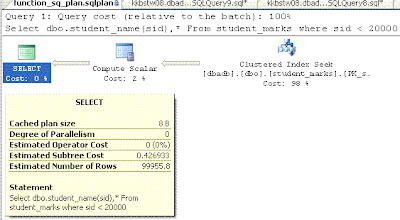

The query plan doesnt show whats exactly happening with in the function/
how many times was the function precisely called.So, to find the same, let me use the DMV dm_exec_query_Stats


SELECT Substring(TEXT, ( statement_start_offset / 2 ) + 1, ( ( CASE
              statement_end_offset
              WHEN -1 THEN Datalength(TEXT)
              ELSE statement_end_offset
                                                               END
       - statement_start_offset ) / 2 ) + 1) AS statement_text,
       Isnull(Object_name(objectid), '-')    AS obj_name,
       execution_count,
       max_elapsed_time,
       max_logical_reads,
       max_logical_writes
FROM   sys.dm_exec_query_stats
       OUTER APPLY sys.Dm_exec_sql_text(plan_handle) AS sqltext
WHERE  TEXT NOT LIKE '%dm_exec_query_Stats%'
ORDER  BY execution_count DESC 
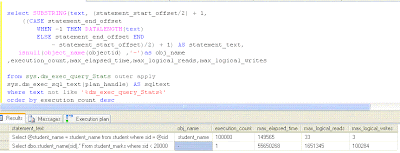


Execution count column on dm_exec_query_stats DMV clearly shows that the query Select dbo.student_name(sid),* From student_marks where sid < 20000 in the function dbo.student_name has been executed 10000 times , which is exactly the same number of rows returned. So its basically passing a number ( sid ) and making the functions' code execute over and over which makes it painfully slow.

Let us Consider the join based solution:

SET statistics io ON

GO
DECLARE @dt DATETIME
SET @dt = Getdate()
SELECT student_name,
       student_marks.*
FROM   student_marks,
       student
WHERE  student_marks.sid = student.sid
       AND student_marks.sid < 20000
SELECT Datediff(ms, @dt, Getdate()) 


Performance Stats :
Time taken : 2876 ms ( 2.9 Seconds)
Rows Returned: 100,000
IO details : Table 'student_marks'. Scan count 1, logical reads 415, physical reads 3, read-ahead reads 412, lob logical reads 0, lob physical reads 0, lob read-ahead reads 0.
Table 'Student'. Scan count 1, logical reads 60, physical reads 1, read-ahead reads 58, lob logical reads 0, lob physical reads 0, lob read-ahead reads 0.


Query plan:
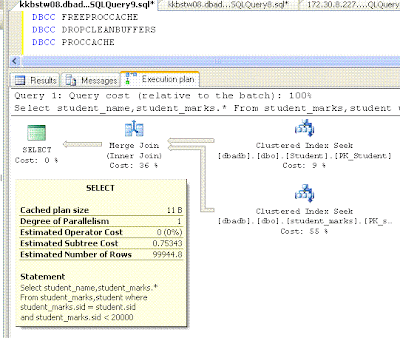

Join based solution completes the query in less than three seconds, which is 20 times faster than Scalar functions. IO also indicates lesser number of reads. The student table is also read only once against 100,000 times as in the case of scalar functions. Query Stats DMV confirm the same.


So the conclusion is, one should always avoid using scalar functions as much as possible and should be used only when we don't have any other option to replace it.Complex string manipulation requirements or date calculation requirements are perhaps, plausible excuses for Scalar functions, but still they have to be used with caution as they have been found as performance bottlenecks more often than not.

Tuesday, November 3, 2009

NOT IN VERSUS NOT EXISTS


Logical difference between NOT IN and NOT EXISTS:

Though 'Not in' and 'Not exists' serve the same purpose, there is a logical difference
in their operation other than 'Not Exists' being correlated.

Before I explain the difference let us see an example.


CREATE TABLE #capital (

  capital_id INT,

  city_name  VARCHAR(100))


CREATE TABLE #city (

  city_name VARCHAR(100),

  country   VARCHAR(100))


INSERT INTO #capital

SELECT 1,

       'New Delhi'

UNION

SELECT 2,

       'Singapore'

UNION

SELECT 3,

       'London'


INSERT INTO #city

SELECT 'New Delhi',

       'India'

UNION

SELECT 'Singapore',

       'Singapore'

UNION

SELECT NULL,

       NULL


Two tables are created.. namely #capital,#city. #capital table contains three cities
.. New Delhi,singapore, London. The #city table contains New Delhi,Singapore and a NULL
row.

We would like to write a query to find the city that is present in Capital and not in
city table. Expected result is London.

First let us take 'NOT IN':


SELECT *

FROM   #capital

WHERE  city_name NOT IN (SELECT city_name

                         FROM   #city)


Straight forward query..
To our surprise, the query returns Zero rows.

Now for NOT EXISTS.


SELECT *

FROM   #capital cp

WHERE  NOT EXISTS (SELECT cy.city_name

                   FROM   #city cy

                   WHERE  cy.city_name = cp.city_name)


Hey presto..it works!!! London is returned.

Why this behaviour with NOT in?

The reason lies in the way in which 'NOT IN' handles NULL.
First point to note is 'NOT IN' condition can return three possible values.
They are True,False,NULL. But 'NOT EXISTS' always returns either True/False.

Closer look at how NOT IN works:-

NOT IN condition returns TRUE when condition check is successful
EX: 'London' NOT IN ( 'New Delhi','Singapore').
NOT IN condition returns FALSE when condition check FAILS
EX: 'London' NOT IN ( 'London','Singapore').

NOT IN condition returns NULL when condition check is made against NULL.
EX:
'London' NOT IN
( 'New Delhi','Singapore',NULL)


Returns NULL because 'London' not in ( NULL) will always return NULL and not TRUE as expected. As for the row to be successfully returned the result of the condition checked ( in this case 'not in') should be TRUE. But because of NULL returned by NOT in ( instead of TRUE ) it is discarded. So if the sub query contains NULL then for NOT IN condition no rows will be returned for any value.

Though 'IN' also has a similar behavior the anomaly is realized only in NOT IN because

'London' IN
( 'New Delhi','Singapore',NULL)

Returns NULL and not TRUE, so 'London' is not returned.


'London' IN
( 'New Delhi','Singapore','London',NULL)

Returns True as 'London' in ( 'London' ) is TRUE though 'London' in ( NULL ) is NULL.
Note that 'IN' needs just one TRUE.

But NULL comparison using '=' returns FALSE always ( assuming you haven't changed the default behavior using SET ANSI_DEFAULTS option). ie NULL = 'London' is always False. So, Not Exists always works.

As I have stressed before , another reason to correlate queries.
Performance wise as well NOT EXISTS performs better than NOT IN.

Tuesday, February 24, 2009

Example for converting Cursor to While loop

Just a small example on how to replace a cursor using an while loop.

Table t1 has one column id of type int.

Assume that a cursor is defined for the query:

Select id from t1

This example narrates how a cursor defined for the above mentioned query
can be replaced using While loop and table variable.


DECLARE  @tbl_var  TABLE(
                         tid     INT
,
                         row_num INT
    IDENTITY ( 1 , 1 )
                         )

DECLARE  @rowcnt INT


DECLARE  @val INT


DECLARE  @row_move INT


INSERT INTO @tbl_var
           (tid)
SELECT id
FROM   t1

SET @rowcnt = @@ROWCOUNT


SET @row_move = 1

WHILE @rowcnt >= @row_move
  BEGIN
    SELECT @val = tid
    FROM   @tbl_var
    WHERE  row_num = @row_move
    
    EXEC Sample_sp_call

      @val
    
    SET @row_move = @row_move + 1
  END

Do's and Dont's while writing Sps

Recently at my workplace I was asked to provide a briefing on Dos and Donts while writing stored procedures. I have just posted a modified version of it.

> Avoiding sub queries/Converting sub queries to Correlated sub queries
I have discussed the same at length in my previous post which can be found here.

> Replace cursors using while loops

Cursors involve row by row processing which can slowdown the execution. Cursor can effectively replaced by while loop and a temporary table to provide better performance. This can also help one avoid errors that occur due to locking.

Example for the same can be found here

> Usage of order by/ distinct

Order by/distinct clause internally results in a sort operation which can increase the execution time. So, Order by/Distinct should be used minimally and only when it is inevitable.

> Effective usage of temp table / table variable.

Long queries when broken down by storing the temporary results to temporary tables/ table variables provide considerable performance boost. Usage of table variables / temporary tables allows one to reuse the previously obtained results and also reduce the duration of locks held on objects. But, Usage of temp table/ temp variable does cause a load on tempdb and system memory.Getting into the details of choice of selection for table variable/temp table is beyond the scope of this post. Please note that if one has a long transaction/query temp table and table variables are good options to look at.

> Avoiding select *

Column names should be specified instead of specifying ‘*’. This ensures unwanted data is not selected. Using ‘*’ can cause syntax errors when the source or destination table structure is modified.

> Avoid non - Sargable conditions

Using non Sargable conditions on ‘where’ clause causes table scan and hence the index created on the column does not get used. Non Sargable conditions are a list of conditions on usage puts the index in vain. They are 'OR', 'not in', <>, column as a parameter of function., eg: dateadd(dd,1,date_of_birth).


> Following ANSI style join

Outer Joins on tables should follow the ANSI Style join as Microsoft supports only the ANSI style joins from SQL Server 2005.

> SET NOCOUNT ON

SET NOCOUNT ON should be added at the starting of all stored procedures as it reduces the additional overhead of calculating row count on the compiler.

> Transaction handling

Transactions should be kept as short as possible as it increases duration of locks held on the objects. Transaction opened using begin transaction should always commits or rollbacks on all paths of the execution flow.
Nested transactions should always be avoided.

> Error Handling

Error handling should be been done at appropriate places using @@Error variable.

The above listed points were obtained from the most common mistakes committed by the developers.There are many many books which speak about effective T SQL Programming. The above list is just obvious ones that I have come across.

Sunday, December 7, 2008

Best Practices - Querying - Avoiding Sub Queries

One of the first steps in basic query tuning is avoiding unneccasary sub queries. I understand this topic has been written again and again. But just couldnt resist writing one on it.


In general, Sub queries are costlier than a join. If a query can be achieved using a join its always the best way. If there is definitely a need to use a sub query, then 'Correlated Sub query' can be good option. Correlated Sub query is a case where a main query column becomes a part of sub query condition. Let us see a few examples.

Consider the query to find the list of customers who have not borrowed money. There are two ways of writing it.
Normal Sub query :

SELECT name
FROM   customer
WHERE  name NOT IN (SELECT customer_name
                    FROM   borrower)


Correlated Subquery:

SELECT name
FROM   customer c
WHERE  NOT EXISTS (SELECT customer_name
                   FROM   borrower
                   WHERE  c.name = customer_name)


In correlated sub queries one also has a chance of improving by creating an index on the sub query 'where' clause if necessary. When index is created on the sub query's where condition it would be extremely effective as the sub query table would not be scanned at all and only the index would be scanned. Also, Correlated sub query can be extended to few more attributes, easily. Ex:


SELECT name
FROM   customer c
WHERE  NOT EXISTS (SELECT customer_name
                   FROM   borrower
                   WHERE  c.name = customer_name
                          AND c.some_attribute = attribute)


Another scenario where sub queries can be easily avoided using a simple variable( or even a join ) is shown below.


SELECT name
FROM   cusotmer c
WHERE  name = (SELECT cusotmer_name
               FROM   borrower
               WHERE  loan_number = 123)


This can be changed to


DECLARE  @StrCustomerName VARCHAR(100)

SELECT @StrCustomerName = custmer_name
FROM   borrower
WHERE  loan_number = 123

SELECT name
FROM   customer
WHERE  name = @StrCustomerName


This would again reduce the IOs/Scans to a great extent. The reasons are obvious.So we can always say that we can replace a sub query to variable when


  • The sub query result is 1 row for sure.


  • The sub query is not correlated.

Another interesting scenario where a sub query can be with a variable is when finding average/highest in a group. Assume you want to find the student(s) with average score.


Standarad way of writing it would be


SELECT student_name
FROM   class
WHERE  MARK = (SELECT Avg
(MARK)
               FROM   class)


Optimized way would be


DECLARE  @intAvgMarks INT

SELECT @intAvgMarks = Avg
(MARK)
FROM   student

SELECT student_name
FROM   class
WHERE  MARK = @intAvgMarks


Simple is it not.. . There are few more workarounds for sub queries which I will try to cover the next few posts. So always try your best to say bye bye to sub queries :)