Lock escalation is a event which occurs when SQL Server decides to upgrade a lock at a lower level hierarchy to a lock to a table level lock., In other words, when a particular query obtains a large number of row level locks/ page level locks, SQL Server decides that instead of creating and granting number of row level/page level locks, it is effective to grant a single table level lock. Or to be precise,
SQL Server upgrades the row/page level locks to table level locks. The above process is termed as lock escalation.
Lock escalation is good, as it reduces the overhead in maintaining a large number of smaller level locks. A lock structure is about occupies about 100 bytes of memory and too many locks can cause a memory pressure.Similarly applying,granting , and releasing locks for each row or page is a resource consuming processes which can be reduced by lock escalation. However, Lock escalation also reduces concurrency. ie, If a query causes lock escalation, then the query obtains a full table level lock, and another query attempting to access the table will have to wait till the first query releases the lock.
How SQL Server decides when to escalate lock ?
* When a query consumes more than 5000 locks per index / heap.
* When the lock monitor consumes more than 40% of the static memory or non AWE alloted memory.
So Let us quickly see lock escalation in action. Consider the following query
SET ROWCOUNT 4990
GO
BEGIN TRAN
UPDATE orders
SET order_description = order_description + ' '
--Rollback
The orders table has a clustered index. Row level locks will be taken on the index keys. SET ROWCOUNT ensures that only 4990 rows are updated by the query. I am leaving the transaction open ( without committing or rolling back ) , so that we can see the number of locks held by the query.
Fire the following query to check the locks held by the above script. The query lists the count of locks for each lock type and object. Note that the session id for the above script on my machine was 53. So filtering by the same.
SELECT spid,
COUNT(*),
request_mode,
[resource_associated_entity_id],
sys.dm_tran_locks.resource_type AS object_type,
Db_name(sysprocesses.dbid) AS dbname
FROM sys.dm_tran_locks,
sys.sysprocesses
OUTER APPLY Fn_get_sql(sql_handle)
WHERE spid = 53
AND sys.dm_tran_locks.request_session_id = 53
AND sys.dm_tran_locks.resource_type IN ( 'page', 'key', 'object' )
AND Db_name(sysprocesses.dbid) = 'dbadb'
GROUP BY spid,
[resource_associated_entity_id],
request_mode,
sys.dm_tran_locks.resource_type,
Db_name(sysprocesses.dbid) 
As one may notice, we can find 4990 key locks / row level locks. Let us rollback transaction and modify the script to use 5000 or more locks.
SET ROWCOUNT 5000
GO
BEGIN TRAN
UPDATE orders
SET order_description = order_description + ' '
--Rollback
Now let us fire the same query on sys.dm_tran_locks. we obtain a single exclusive lock on the table/object. There are no key or row level locks as SQL Server as per its rule has escalated the row level locks to a table level lock.
SQL Server 2005 had a server wide setting to disable lock escalations. On SQL Server 2005, when the trace flag 1211/1224 are set, no query is allowed to escalate locks on the entire server. Ideally, we would like to have it as a object/table level setting which was provided by SQL Server 2008. SQL Server 2008 allows one to disable lock escalations at table/ partition levels.
Consider the following command in SQL 2k8
ALTER TABLE orders SET CONSTRAINT (LOCK_ESCALATION = DISABLE )
GO
The ALTER TABLE command's LOCK_ESCALATION property accepts three values.
* Disable -> Disables lock escalation ( Except a few exceptions . Refer Books online for details )
* Table -> Allows SQL Server to escalate to table level. That is the default setting.
* Auto -> Escalation will be partition level if the table is partitioned. Else escalation is always up to table level.
Let us rollback the open transaction created earlier and run the ALTER TABLE command posted above to disable lock escalations. Now let us run the same script to update 5000 records again and see if lock escalation has actually occurred.
As you may now notice, for the same 5000 rows, there is no lock escalation occuring this time as we have disabled it using the ALTER TABLE command. The picture shows 5000 key/row locks which is not possible at the default setting of lock escalation.
The intention behind this post was to introduce lock escalation, show how it works and also explain the new option provided to change lock escalation setting SQL Server 2008. Upcoming posts, we will dive deeper into the topic and understand when and under what circumstances can we play with lock escalation setting.
Monday, November 29, 2010
Lock escalation : SQL Server 2008

Tuesday, November 16, 2010
Backup log Truncate_Only in SQL Server 2008
BACKUP LOG <db_name> WITH truncate_only command, used for clearing the log file, is deprecated in SQL Server 2008. So this post will explain option available in SQL Server 2008 for truncating the log.
Step 1: Change the recovery model to Simple
USE [master]
GO
ALTER DATABASE [dbadb]
SET recovery simple WITH no_wait
GO
Step 2: Issue a checkpoint
One can issue a checkpoint using the following command.
CHECKPOINT
GO
Checkpoint process writes all the dirty pages in the memory to disk. On a simple recovery mode, the checkpoint process clears the inactive portion of the transaction log.
Step 3: Shrink the log file
USE dbadb
GO
DBCC shrinkfile(2, 2, truncateonly)
Shrinking the log file with a truncateonly option clears the unused space at the end of the log file. First parameter of the Shrinkfile takes the filed id within the database. Mostly the fileid of the log file is 2. You may verify the same by firing a query on sysfiles.
Step 4: Change the recovery model back to full/bulk logged
Change the recovery model to the recovery model originally ( full/bulk logged ) used by the database.
USE [master]
GO
ALTER DATABASE [dbadb]
SET recovery FULL WITH no_wait
GO
After these steps the log file size should have reduced.
The intention behind this post is not to encourage truncating the log files. Use the method explained, only when you are running short of disk space because of a log file growth. Note that, Just like truncating log files, Changing the recovery model also disturbs the log chain. After clearing the log using the above method, you need to either run a full backup/Differential backup to keep your log chain intact for any recovery.
Just a quick demo to show that the log chain breaks if you change the recovery model.
The database whose log file we will be clearing is dbadb. Log file size 643 MB as shown below.
After executing the scripts mentioned above, the log file size is 2 MB as shown below.
The log chain breaks after changing the recovery model. When log chain breaks, subsequent transaction log backups start failing as shown below.
Transaction log backups will be successful only after the execution of full or differential backup.
PS: Pardon me for a SQL 2k8 post, when the whole world is going crazy about
SQL Denali :)
Wednesday, April 7, 2010
Sparse column - Maximum size of a row
Just to clarify, by including a sparse column, the maximum size of the row DOES NOT reduce to 8018 bytes.Quite a few sites have mentioned that sparse column reduces the max row size to 8018 , but its not true.What is true is that the total size occupied by sparse columns alone shouldn't exceed 8019 bytes. The row size ( sparse columns size + normal columns size ) can be greater than 8018 bytes and has the normal row limitation of 8060 bytes. The script provided below illustrates the same.
DROP TABLE [sparse_col]
GO
CREATE TABLE [dbo].[sparse_col]
(
[dt] [DATETIME] NOT NULL,
[value] [INT] NULL,
data CHAR(500) NULL,
sparse_data CHAR(7500) SPARSE NULL,
)
GO
INSERT INTO [sparse_col]
SELECT Getdate(),
0,
'sparse_data',
'sparse data'
GO
The insert is successful without any errors.
Note that the sparse column 'sparse_data' has a size of 7500 bytes.
Total size of the row when all columns have non null value will exceed 8018 bytes.
Actual size of the row can be checked using DMV dm_db_index_physical_stats as shown below.
DECLARE @dbid INT;
SELECT @dbid = Db_id();
SELECT Object_name(object_id) AS [table_name],
record_count,
min_record_size_in_bytes,
max_record_size_in_bytes,
avg_record_size_in_bytes
FROM sys.Dm_db_index_physical_stats(@dbid, NULL, NULL, NULL, 'Detailed')
WHERE Object_name(object_id) = 'sparse_col' 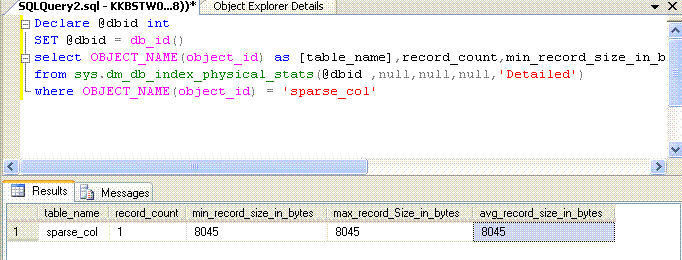
The size of the row is 8045 bytes, which is above 8018 bytes.Thus its clear that adding a column as sparse column doesnt reduce the size of the row to be 8018 bytes.
Now let us see an example which generates the actual error.
Run the following script.
The script used earlier is slightly modified by changing the 'data' column to sparse. Rest of the structure remains the same with no changes done to the length of the columns.So, the sparse columns on the table are data,sparse whose combined size are 8000 + few bytes used for internal use for storing sparse data.
DROP TABLE [sparse_col]
GO
CREATE TABLE [dbo].[sparse_col]
(
[dt] [DATETIME] NOT NULL,
[value] [INT] NULL,
data CHAR(500) SPARSE NULL,
sparse_data CHAR(7500) SPARSE NULL,
)
GO
INSERT INTO [sparse_col]
SELECT Getdate(),
0,
'some data',
'sparse data'
The insert fails with the error
Msg 576, Level 16, State 5, Line 1
Cannot create a row that has sparse data of size 8031 which is greater than the allowable maximum sparse data size of 8019.
The reason is that the total size consumed by sparse_data,data column is 8000 bytes + 31 bytes used for internal use which exceeds the total size allowed (8019 bytes) for sparse columns.
Reference: SQL Server 2008 Internals by Kalen Delaney :)
Friday, April 2, 2010
Sparse Columns
Sparse columns are a new column property introduced in SQL Server 2008, to improve the storage of NULL values on columns.When a column is defined as SPARSE, and if a null is inserted on the column then the column doesnt occupy any space at all.
Some facts:
* A Non varying column with a NULL value occupies the entire length of the column.( Datetime column with null occupies 8 bytes)
* A varying column(varchar) with a NULL value occupies a minimum of two bytes.
So, by defining a column sparse one can save the space that is wasted when NULL values are inserted.But Sparse columns come at a cost. When a sparse column
contains NON NULL value / Valid value, it consumes extra 4 bytes of space. So,
one is expected to use sparse columns only when 90% of the value on the sparse column is expected to be null.
Example:
Consider the following table.
CREATE TABLE [dbo].[sparse_col]
(
[dt] [DATETIME] NOT NULL,
[value] [INT] NULL,
data CHAR(500) NULL
)
Data column doesnt have a sparse property defined on it. Let me insert 10,000 rows using the following script
DECLARE @id INT
SET @id = 1
WHILE @id <= 10000
BEGIN
INSERT INTO [sparse_col]
SELECT Getdate(),
@id,
NULL
SET @id = @id + 1
END
The spaceused occupied by the table is 6280 kb as shown below.
Let us recreate the table with 'data' column defined as a sparse column.
CREATE TABLE [dbo].[sparse_col]
(
[dt] [DATETIME] NOT NULL,
[value] [INT] NULL,
data CHAR(500) Sparse NULL
)
The same script provided above is used to insert the rows. The space occupied is just 264KB after switching to sparse column.
Size of a row :
Size of each row in SQL Server 2008 is limited to 8060 bytes. Sparse columns doesnt allow one to exceed this limitation.The size of all Non null sparse columns of a row is limited to 8019 byes.
Example:
Let us change the table definition , by adding addtional column
ALTER TABLE sparse_col ADD data2 CHAR(8000) Sparse NULL
INSERT INTO sparse_col
SELECT Getdate(),
5,
NULL,
NULL
The above insert works. But the below doesnt.
INSERT INTO sparse_col
SELECT Getdate(),
5,
'x',
'x'
The insert fails with a error indicating that the size of the row exceeded 8060 byte limitation.
Adding more than 1024 columns:
By default SQL Server 2008 allows 1024 columns per table. But, by using sparse columns one can increase the number of columns to 30,000. However, there can be a maximum of 1024 non sparse columns on the table and the rest have to be sparse columns. The sparse columns defined will have to be grouped using the Column set feature introduced in SQL Server 2008. Column set is a untyped XML column which will group all the sparse columns on the table. The Column set column is a virtual column which doesnt get stored in the table. For more details refer here.
A table with more than 1024 columns is called a wide table and it can be defined with the following script.
DROP TABLE [sparse_col]
GO
CREATE TABLE [dbo].[sparse_col]
(
[dt] [DATETIME] NOT NULL,
[value] [INT] NULL,
data CHAR(500) Sparse NULL,
specialpurposecolumns XML COLUMN_SET FOR ALL_SPARSE_COLUMNS
)
A table with the column set feature is created using the above script. SpecialPurposeColumns is a column set which will be grouping all the sparse columns in the table.The script provided below adds more sparse columns to the table.
DECLARE @id INT
SET @id = 1
DECLARE @sql NVARCHAR(100)
WHILE @id < 25000
BEGIN
SET @sql = 'ALTER TABLE [sparse_col] ADD Col' + CONVERT(VARCHAR, @id) + ' int sparse null '
EXEC Sp_executesql @sql
SET @id = @id + 1
END
The above script adds 25000 columns to a table. One doubts whether its neccassary.
Sparse columns do come with many restrictions like sparse columns cant participate in primary keys,sparse columns cant have default values etc. For complete set of restrictions refer here